🪝 Events Webhook
The Notification Events Webhook allows you to receive real-time updates about notification events such as delivery, opens, clicks, and unsubscribes. By setting up a publicly accessible API endpoint, you can track and react to these events programmatically.
Why Use Notification Events Webhook
Many organizations need to track notification engagement for various purposes:
- Build custom analytics dashboards to measure notification performance
- Create automated workflows triggered by specific notification events
- Track user engagement with notifications across channels
- Develop complex integrations with other systems based on notification events
How It Works
When specific events occur in the notification lifecycle (such as email opens or clicks), our system sends HTTP requests to your designated endpoint with detailed information about the event.
// Example webhook payload for an email open event{ "eventType": "EMAIL_OPEN", "trackingId": "abc123", "notificationId": "welcome-email", "channel": "EMAIL", "userId": "user-123"}Dashboard Configuration
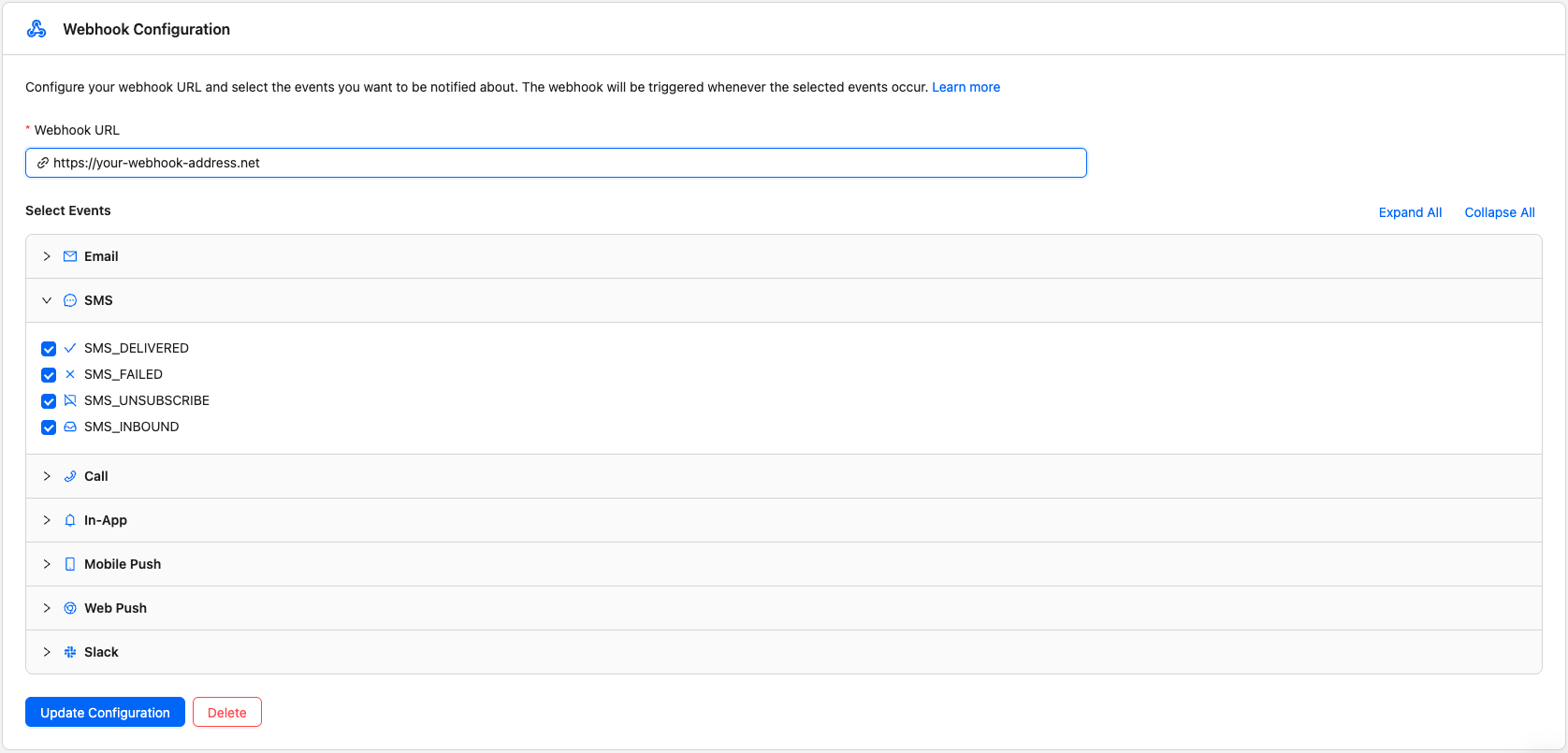
You can configure one or more webhook endpoints and select which events each one receives through the Pingram dashboard:
- Navigate to the “Webhook” section of the Pingram dashboard
- Click Add endpoint (or select an existing endpoint)
- Enter your webhook URL (e.g.,
https://your-webhook-url.com) - Select the events you want that endpoint to receive
- Click Save endpoint
Each endpoint has its own signing secret.
Supported Events
The webhook currently supports the following notification events:
| Event | Description | Payload |
|---|---|---|
EMAIL_DELIVERED | Triggered when an email notification is delivered | { eventType: “EMAIL_DELIVERED”, trackingId: string, notificationId: string, channel: “EMAIL”, userId: string } |
EMAIL_OPEN | Triggered when a recipient opens an email notification | { eventType: “OPEN”, trackingId: string, notificationId: string, channel: “EMAIL”, userId: string } |
EMAIL_CLICK | Triggered when a recipient clicks a link in an email notification | { eventType: “CLICK”, trackingId: string, notificationId: string, channel: “EMAIL”, userId: string } |
EMAIL_FAILED | Triggered when an email notification fails to deliver | { eventType: “EMAIL_FAILED”, trackingId: string, notificationId: string, channel: “EMAIL”, userId: string, failureCode?: string } |
EMAIL_UNSUBSCRIBE | Triggered when a recipient unsubscribes via the unsubscribe link | { eventType: “EMAIL_UNSUBSCRIBE”, notificationId: string, channel: “EMAIL”, userId: string } |
EMAIL_INBOUND | Triggered when inbound email is received. The whole message can be up
to 40 MB. See Inbound Messages for | { eventType: “EMAIL_INBOUND”, from: string, matched: { email, name? }, to?: string (deprecated), cc?: string[] (deprecated), toRecipients?: { email, name? }[], ccRecipients?: { email, name? }[], subject: string, trackingId: string, userId: string, type: string } |
SMS_FAILED | Triggered when an SMS notification fails to deliver | { eventType: “SMS_FAILED”, trackingId: string, notificationId: string, channel: “SMS”, userId: string, failureCode?: string } |
SMS_DELIVERED | Triggered when an SMS notification is delivered | { eventType: “SMS_DELIVERED”, trackingId: string, notificationId: string, channel: “SMS”, userId: string } |
SMS_UNSUBSCRIBE | Triggered when a recipient opts out of SMS (e.g., replies STOP) or via the unsubscribe page | { eventType: “SMS_UNSUBSCRIBE”, notificationId: string, channel: “SMS”, userId: string } |
SMS_SUBSCRIBE | Triggered when a recipient opts back into SMS by replying START to your sending number | { eventType: “SMS_SUBSCRIBE”, trackingId: string, notificationId: string, channel: “SMS”, userId: string } |
SMS_INBOUND | Triggered when a recipient replies to an SMS notification (text and, when sent, MMS media). See Inbound Messages for details. | { eventType: “SMS_INBOUND”, from: string, to: string, text: string, receivedAt: string, userId: string, lastTrackingId: string, media?: { url: string; contentType?: string }[] } |
CALL_FAILED | Triggered when a call notification fails | { eventType: “CALL_FAILED”, trackingId: string, notificationId: string, channel: “CALL”, userId: string, failureCode?: string } |
CALL_UNSUBSCRIBE | Triggered when a recipient opts out of a call (e.g., ends the call) or via the unsubscribe page | { eventType: “CALL_UNSUBSCRIBE”, notificationId: string, channel: “CALL”, userId: string } |
SLACK_FAILED | Triggered when a web push notification fails to deliver | { eventType: “SLACK_FAILED”, trackingId: string, notificationId: string, channel: “SLACK”, userId: string, failureCode?: string } |
SLACK_UNSUBSCRIBE | Triggered when a recipient opts out of a Slack notification via the unsubscribe page | { eventType: “SLACK_UNSUBSCRIBE”, notificationId: string, channel: “SLACK”, userId: string } |
ACCOUNT_USAGE | Sent when monthly usage crosses a new whole percent. Current billing measures spend against the budget. Billing v1 measures message count against messagesCap, and those counts are returned in spent and costCap. Includes the reset date, whether auto-upgrade is on, and per-channel volume and cost. | { eventType: “ACCOUNT_USAGE”, trackingId: string, accountId: string, yearMonthDay: string, resetsOn: string, percent: number, spent: number, costCap: number, autoUpgrade: boolean, usage: { [channel]: { count: number, cost: number } } } |
Setting Up Your Webhook
To receive notification events:
- Create a publicly accessible HTTPS endpoint that can receive POST requests. Private and link-local addresses are rejected.
- Configure your webhook URL in the Pingram dashboard
- Select which events you want to receive (EMAIL_OPEN, EMAIL_CLICK, EMAIL_FAILED, SMS_FAILED, etc.)
- Implement proper validation of incoming webhook requests
- Process and store the event data as needed for your use case
Return a 2xx HTTP status from your endpoint to acknowledge receipt. Each delivery is attempted up to 3 times. Each attempt has 6 seconds: the call times out at 6 seconds, or a faster failure waits out the rest of those 6 seconds. A 2xx response stops delivery immediately. The payload and trackingId stay the same on every attempt. The signature timestamp is new for each attempt.
What your endpoint receives
Each event is sent as an HTTP POST with a JSON body. The exact fields depend on the event type. After you send a notification, events are sent to your URL as they occur (e.g. delivered, then open, then click), so you see the full event lifecycle.
Example: EMAIL_DELIVERED
{ "eventType": "EMAIL_DELIVERED", "trackingId": "0192a1b2-c3d4-5e6f-7890-abcd1234ef56", "notificationId": "welcome-email", "channel": "EMAIL", "userId": "user-123"}Example: EMAIL_OPEN
{ "eventType": "EMAIL_OPEN", "trackingId": "0192a1b2-c3d4-5e6f-7890-abcd1234ef56", "notificationId": "welcome-email", "channel": "EMAIL", "userId": "user-123"}Example: EMAIL_CLICK (includes clickedLink and optionally clickedLinkTags)
{ "eventType": "EMAIL_CLICK", "trackingId": "0192a1b2-c3d4-5e6f-7890-abcd1234ef56", "notificationId": "welcome-email", "channel": "EMAIL", "userId": "user-123", "clickedLink": "https://example.com/action", "clickedLinkTags": {}}Example: EMAIL_FAILED (includes failureCode)
{ "eventType": "EMAIL_FAILED", "trackingId": "0192a1b2-c3d4-5e6f-7890-abcd1234ef56", "notificationId": "welcome-email", "channel": "EMAIL", "userId": "user-123", "failureCode": "BOUNCE"}Example: EMAIL_UNSUBSCRIBE (no trackingId)
{ "eventType": "EMAIL_UNSUBSCRIBE", "notificationId": "welcome-email", "channel": "EMAIL", "userId": "user-123"}Example: SMS_INBOUND (plain SMS)
{ "eventType": "SMS_INBOUND", "from": "+14155551234", "to": "+16505550100", "text": "Thanks, that works!", "receivedAt": "2026-04-22T12:34:56.789Z", "userId": "user-123", "lastTrackingId": "0192a1b2-c3d4-5e6f-7890-abcd1234ef56"}Example: SMS_INBOUND (MMS—one or more attachments from the carrier)
When the reply includes picture message(s), media is an array of objects with provider-hosted url and optional contentType. Omitted or empty when the message is SMS-only.
{ "eventType": "SMS_INBOUND", "from": "+14155551234", "to": "+16505550100", "text": "See attached", "receivedAt": "2026-04-22T12:34:56.789Z", "userId": "user-123", "lastTrackingId": "0192a1b2-c3d4-5e6f-7890-abcd1234ef56", "media": [ { "url": "https://cdn.hosting...", "contentType": "image/jpeg" } ]}Other channels (SMS delivery events, Call, etc.) use the same shape: eventType, trackingId (when applicable), notificationId, channel, userId, and for failure events, failureCode. Inbound SMS uses the dedicated shape above instead of notificationId / channel. ACCOUNT_USAGE is an account event, not a notification event:
{ "eventType": "ACCOUNT_USAGE", "trackingId": "acct_123:2026-09-06:43", "accountId": "acct_123", "yearMonthDay": "2026-09-06", "resetsOn": "2026-10-06", "percent": 43, "spent": 8.6, "costCap": 20, "autoUpgrade": true, "usage": { "EMAIL": { "count": 1200, "cost": 0.6 }, "SMS": { "count": 40, "cost": 8.0 } }}On billing v1, percent is the message count divided by messagesCap. spent is that message count and costCap is messagesCap. SMS and calls have their own limits and are not included in the percent.
percent is the whole percent just reached. yearMonthDay is the start of the current billing period, and resetsOn is the day that budget resets. usage lists only channels with volume or cost. See the Supported Events table for all event types.
Verifying Webhooks
To ensure webhook requests are authentic and haven’t been tampered with, Pingram signs every webhook with an HMAC-SHA256 signature.
Why verify webhooks?
Without verification, attackers could:
- Spoof requests — Send fake webhook payloads pretending to be Pingram
- Replay attacks — Resend intercepted valid requests to trigger duplicate processing
Signature headers
Every webhook request includes three headers:
| Header | Description |
|---|---|
X-Pingram-Id |
Event trackingId for idempotency and signature verification |
X-Pingram-Signature |
Versioned HMAC-SHA256 signature (format: v1,{hex-signature}) |
X-Pingram-Timestamp |
Unix timestamp in milliseconds when the webhook was sent |
Webhook secret
Your webhook secret is returned when you configure webhooks via the API. The response includes a secret field:
{ "id": "019abc12-3456-7890-abcd-ef1234567890", "webhook": "https://your-api.com/webhooks/pingram", "events": ["EMAIL_DELIVERED", "EMAIL_OPEN"], "secret": "pingram_whsecret_abc123..."}Store this secret securely (e.g., in environment variables).
Signature scheme
The signature header has the format v1,{hex-signature} where the signature is computed as:
HMAC-SHA256(trackingId + "." + timestamp + "." + rawBody, secret)Where:
trackingIdis the value fromX-Pingram-Id(same astrackingIdin the payload)timestampis the value fromX-Pingram-TimestamprawBodyis the raw request body as a string (not parsed JSON)secretis your webhook secret (format:pingram_whsecret_...)- The result is hex-encoded
SDK verification (Node.js)
The Pingram SDK provides built-in verification:
import { NextRequest, NextResponse } from 'next/server';import {  verify,  WebhookSignatureError,  WebhookTimestampError} from 'pingram/webhooks';
export async function POST(req: NextRequest) {  try {    const event = verify({      payload: await req.text(),      headers: {        id: req.headers.get('x-pingram-id')!,        signature: req.headers.get('x-pingram-signature')!,        timestamp: req.headers.get('x-pingram-timestamp')!      },      secret: process.env.PINGRAM_WEBHOOK_SECRET!    });
    // Process the verified event    switch (event.eventType) {      case 'EMAIL_OPEN':        console.log('Email opened by:', event.userId);        break;      case 'EMAIL_CLICK':        console.log('Clicked link:', event.clickedLink);        break;    }
    return NextResponse.json({ received: true });  } catch (err) {    if (err instanceof WebhookSignatureError) {      return new NextResponse('Invalid signature', { status: 401 });    }    if (err instanceof WebhookTimestampError) {      return new NextResponse('Request expired', { status: 401 });    }    return new NextResponse('Bad request', { status: 400 });  }}
Manual verification (other languages)
For languages without SDK support, verify webhooks manually:
- Extract headers — Get
X-Pingram-Id,X-Pingram-Signature, andX-Pingram-Timestampfrom the request - Parse signature — Extract the hex signature from the
v1,{signature}format - Compute expected signature —
HMAC-SHA256(trackingId + "." + timestamp + "." + rawBody, secret), hex-encoded - Compare signatures — Use constant-time comparison to prevent timing attacks
- Check timestamp — Reject requests older than 5 minutes (300 seconds)
Python example:
import hmacimport hashlibimport time
def verify_webhook(payload: str, tracking_id: str, signature: str, timestamp: str, secret: str) -> bool:    # Check timestamp (reject if older than 5 minutes)    ts = int(timestamp)    age = abs(time.time() * 1000 - ts) / 1000    if age > 300:        return False
    # Parse signature (extract from v1,{signature} format)    if not signature.startswith("v1,"):        return False    raw_signature = signature[3:]
    # Compute expected signature    signed_payload = f"{tracking_id}.{timestamp}.{payload}"    expected = hmac.new(        secret.encode(),        signed_payload.encode(),        hashlib.sha256    ).hexdigest()
    # Constant-time comparison    return hmac.compare_digest(expected, raw_signature)
Error classes
The SDK throws specific errors for different failure cases:
WebhookSignatureError— Signature doesn’t match (invalid secret or tampered payload)WebhookTimestampError— Timestamp is outside tolerance (replay attack or clock skew)
FAQ
Q: What is the format of the webhook requests?
A: Webhook requests are sent as HTTP POST requests with JSON payloads containing event details such as eventType, trackingId, notificationId, channel, and userId.
Q: Can I filter which events I receive?
A: Yes, you can select which events to receive (EMAIL_OPEN, EMAIL_CLICK, EMAIL_FAILED, SMS_FAILED, etc.) in the dashboard configuration.
Q: What response should my endpoint return?
A: Your endpoint should return a 2xx HTTP status code to acknowledge successful receipt of the webhook. Pingram tries each endpoint up to 3 times. Each attempt has 6 seconds: the call times out at 6 seconds, or a faster failure waits out the rest of those 6 seconds. Delivery stops on the first 2xx response.
Q: When would I receive failure events?
A: You’ll receive channel-specific failure events (EMAIL_FAILED, SMS_FAILED, CALL_FAILED, etc.) whenever a notification fails to deliver through the respective channel. This could happen for various reasons like invalid recipient details, network issues, service provider failures, or user-specific delivery problems. These events help you track delivery failures across specific notification channels. The failureCode field in the payload provides a specific error code indicating the reason for the failure.
Q: Can I delete or update my webhook configuration?
A: Yes. You can add multiple endpoints, update each endpoint’s URL or selected events, or delete an endpoint from the dashboard. Deleting the last endpoint stops all event delivery.
Q: How large can an inbound email webhook be?
A: Pingram accepts the whole inbound message up to 40 MB, including headers. There is no separate per-attachment cap. Each attachment is base64 in the JSON, so the HTTP body is about one third larger than the raw message. Your endpoint has to accept that JSON. A smaller platform cap, such as Vercel’s 4.5 MB request limit, can still reject it. See Inbound size limits. Outbound attachments are separate: about 4 MB raw inline, or up to 20 MB by URL.